





© 2025 PriceIntelGuru. All Rights Reserved
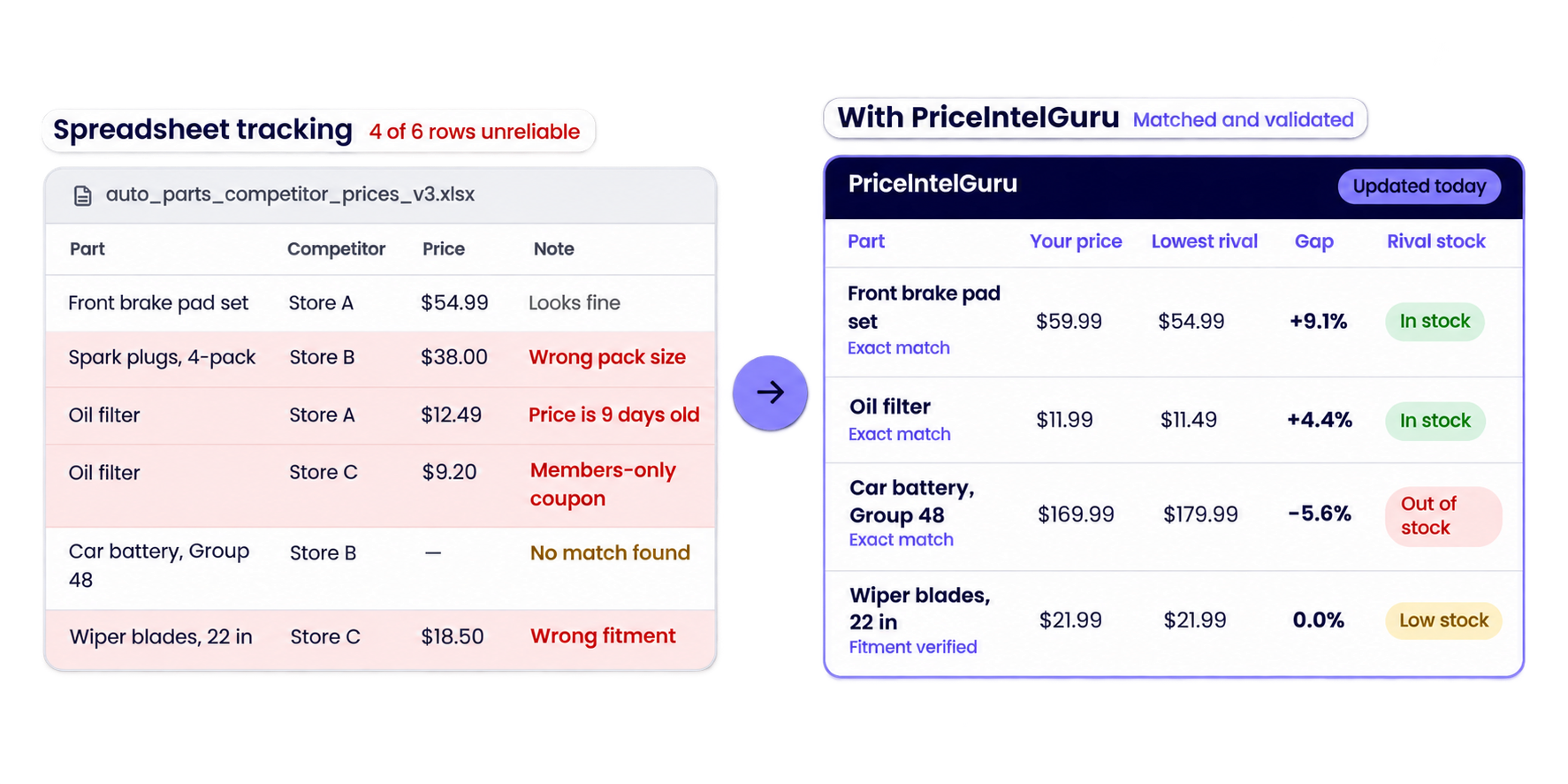
Most competitor price data never makes it into a pricing decision. Someone on the team spots a listing matched to the wrong pack size, or a coupon price only loyalty members can get, and the report loses credibility. We see it constantly with retailers, brands and distributors. That’s why we built PriceIntelGuru around accurate product matching first. When every SKU is compared against the right competitor listing, your price and stock alerts, and the repricing rules behind them, run on numbers your team can defend. Here’s how setting up AI-powered price intelligence on PriceIntelGuru works, from the catalog you share with us to the first report your team acts on.
What You Need Before You Start
Setup moves quickly when you come in with four things ready, and none of them need to be perfect on day one.
- Product list: A spreadsheet export or product feed with SKU, title and brand, plus any identifiers you track, such as UPC, EAN, MPN or internal part numbers. Include product URLs and images if you have them, since they give our AI more to match on.
- Competitor set: The retailers, distributors and marketplace sellers your customers compare you with. Add Amazon, Walmart, eBay or Google Shopping if those channels matter in your category.
- Priority SKUs: The categories, brands or products that drive the most revenue or face the most price pressure. We monitor these first and most often.
- Pricing guardrails: Costs and minimum margins by category, if you plan to use Smart Repricing.
Most teams already have the product list in an ERP export and the competitor list in their sales team’s heads. The competitor list is the one people underestimate. Teams name the ten biggest players in their market and miss the regional distributor or third-party marketplace seller that wins their customers’ orders. Ask your sales team which competitors come up in lost deals. That list is usually more useful than the obvious one.
Step 1: Share Your Catalog and Competitive Set
Once you send your files, we turn them into a monitoring scope. The main job here is mapping each competitor to the categories where it competes with you. A home goods chain might undercut you on cookware and not sell bedding at all, so tracking it across your whole catalog only adds noise. Regions and channels get the same treatment. A competitor’s US and Canadian sites often show different prices, and we track each one separately when both matter to your business.
We also review your product file for gaps, such as duplicate SKUs or missing brand names, and send back a short list to fix. You approve the final scope before matching begins.
Step 2: Product Matching and Validation
Every number in your reports depends on this step, so we finish it before any price tracking starts. Our advanced AI product matching reads competitor listings the way an experienced category manager would. It weighs brand, model and specifications together, and it understands that sellers describe the same thing differently, so “5 in” and “5 inches” count as one measurement.
Here’s how that plays out for a single SKU, an 18V cordless drill sold as a kit with two batteries:
Exact matches go straight into your price comparisons. Similar matches cover close alternatives, including competitor private labels, which become your benchmark when no identical product exists. Anything the AI scores with low confidence goes to review, and your team has the final say on every match. Across PriceIntelGuru, matching accuracy runs at 99.2%.
Step 3: Set Monitoring Frequency by Category
Checking more often doesn’t automatically give you better data. Pull prices on slow-moving products every few hours and your team gets buried in changes that never affect a decision. We set monitoring frequency category by category, based on how fast prices move in each one.
Fast-moving categories, such as consumer electronics and household essentials, are checked daily. During peak events like Black Friday and Cyber Monday, we raise that to several checks a day for the products you care about most. Industrial supplies, building materials and other lines where list prices hold for weeks do fine on a weekly schedule. You can change any schedule as your priorities shift.
Step 4: Configure Alerts
Send too many alerts and your team stops reading them within a week. We help you pick a short list of triggers, each tied to a call your team already makes:
- Price gap thresholds: Get notified when a competitor moves more than a set percentage from your price, say 5% below on a top seller, instead of on every 50-cent change.
- Competitor stock-outs: When a rival runs out of a product you carry, shoppers start looking elsewhere, and you want to know that day.
- MAP violations: Brands see the moment a reseller advertises below the minimum advertised price.
- Buy Box changes: Marketplace sellers find out when they win or lose the Buy Box on key listings.
Step 5: Choose Delivery
Price intelligence only pays off when the right people see it. Most pricing and category teams work in the PriceIntelGuru dashboard, filtering by competitor, brand or channel and exporting reports in a few clicks. Companies with in-house analytics pull the same data through our API into their BI tools, ERP or pricing engine. If you’d rather not add another platform, Data-as-a-Service delivers clean, structured files on your schedule.
Step 6: Connect to Action with Smart Repricing
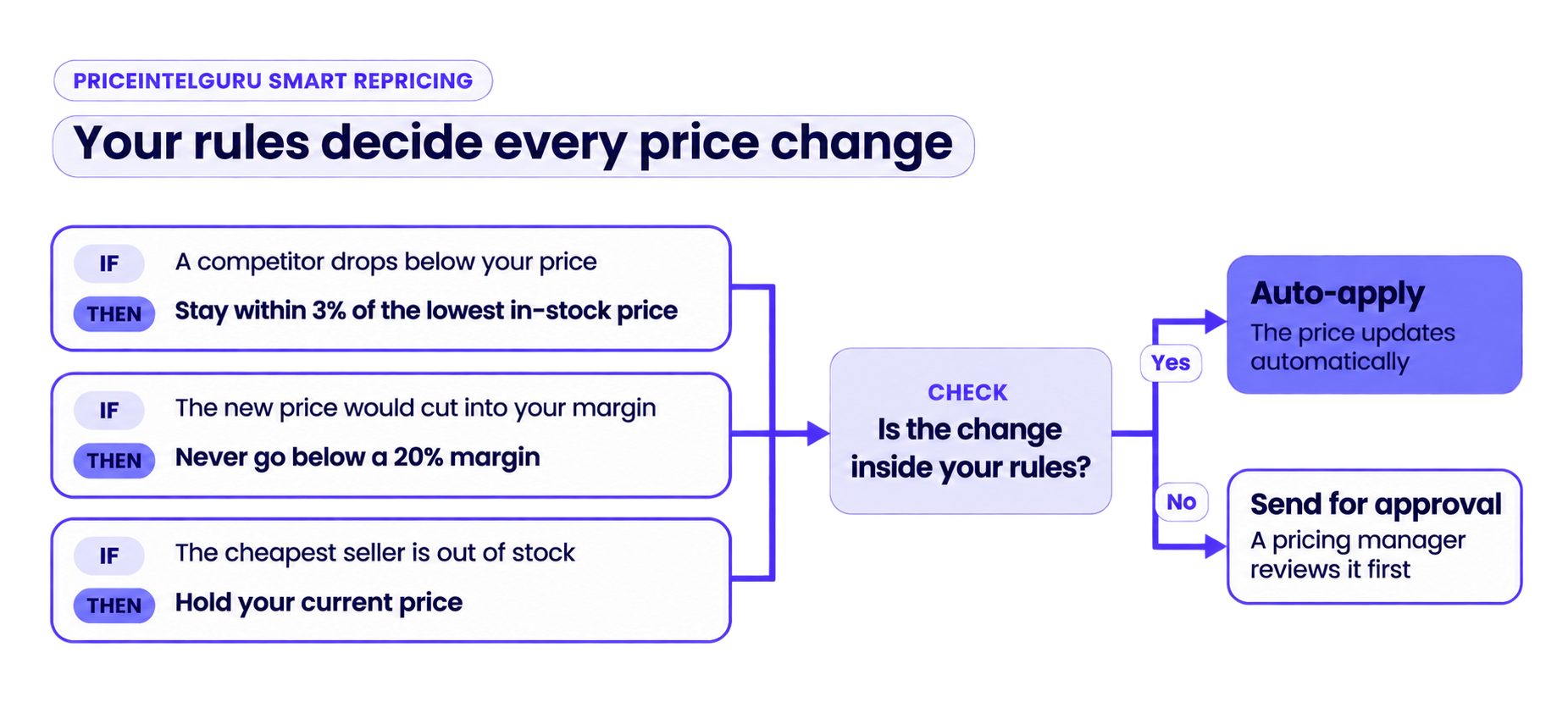
Monitoring shows you what changed in the market. Smart Repricing acts on it within limits you control. For example, you can tell it to stay within 3% of the lowest in-stock competitor but never drop below a 20% margin. If the cheapest seller runs out of stock, it holds your price instead of chasing a listing nobody can buy. The margin floors you gathered before setup become the hard limits. Changes inside your rules apply automatically, and anything outside them waits for a pricing manager’s approval. This keeps you competitive without chasing every discount, a trap we cover in our guide to promotion intelligence.
What Your First Report Looks Like
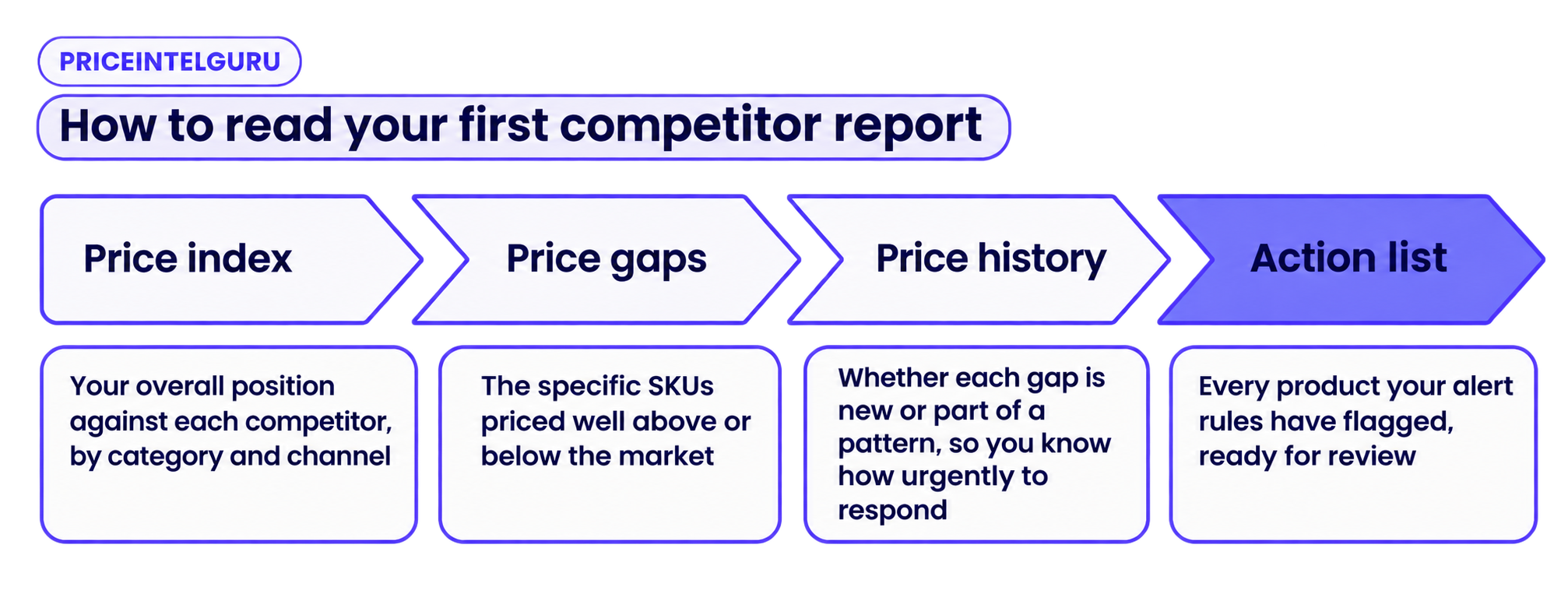
Once matches are approved and monitoring is running, your first competitor report reads from left to right, the same way a pricing review should run.
The quickest wins usually come from the price gaps, especially products you’re selling well below market with no reason to.
Conclusion
Setting up our AI competitor price monitoring tool is a one-time effort, and the data gets more useful every week after that. A few months of price history shows you which competitors discount on a predictable schedule and which ones respond when you change your prices. It also tells you who isn’t worth tracking closely anymore. Pricing meetings get shorter once that history is in place, because the discussion moves from checking the numbers to deciding what to do with them.
Schedule a walkthrough with our pricing experts to see PriceIntelGuru matched against your own catalog and competitors.


